Dev & CodeFreev1.0
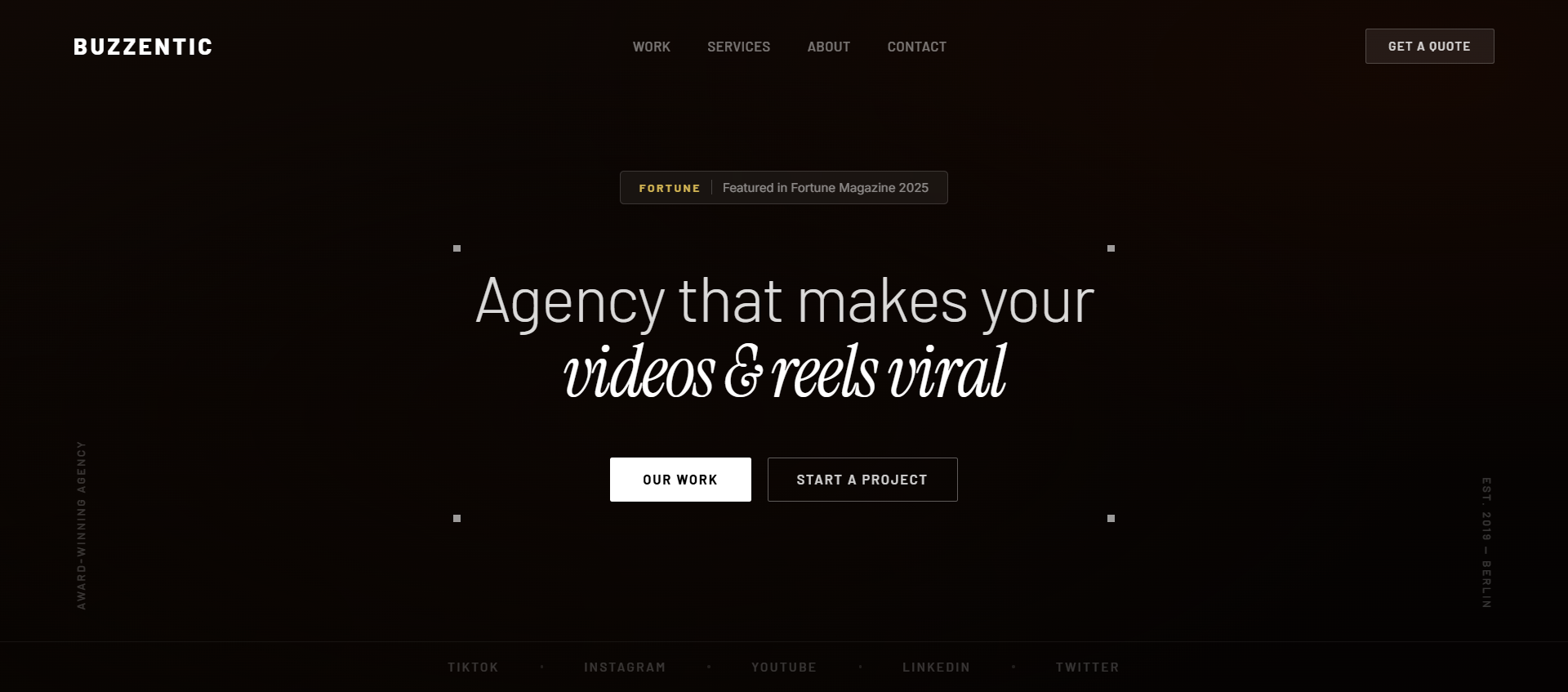
Agency Hero , Full-Screen Video, Liquid Glass Badge, Corner Accents
High-impact video agency hero with transparent floating navbar, liquid glass badge, Instrument Serif italic headline, sharp rectangular buttons, and four corner accent squares.
agencyheroreacttailwindclaudelovablecursorvideo-backgroundliquid-glasscreative
When to use
Use for video editing agencies, creative studios, or any business that wants a bold, cinematic landing page without JS animation libraries.
Recommended LLMs
Claude SonnetGPT-4o
Plugins / Skills
Projects (Claude)Artifacts (Claude)
When to use
A no-animation, purely CSS-driven hero for agencies that want to look expensive. The 100% video opacity (no darkening overlay) is intentional — the video IS the design. The liquid glass badge and four corner white squares are the signature details.
What you'll need to customise
- Video URL — swap the CloudFront MP4 for your own video
- Agency name — replace "Buzzentic" in the navbar logo
- Headline — the two-line structure works for any agency tagline
- Button labels — "Watch Reel" and "Book a Call" or similar
Tips for best results
- The 100% video opacity is crucial to the aesthetic — don't add a dark overlay
- The four corner squares use absolute positioning inside the content container — keep them
7px × 7px solid white - The "Featured in Fortune" badge uses nested blur — outer
backdrop-blur-sm, innerbackdrop-blur-md - Barlow + Instrument Serif italic is the font pairing — both are Google Fonts
Expected output
A React component with:
- Transparent floating navbar (no background, no border)
- Full-screen video background at 100% opacity
- Centered "Featured in" liquid glass badge
- Two-line headline: Barlow + Instrument Serif italic
- Two sharp rectangular CTA buttons (2px border-radius)
- Four 7×7px white corner squares on the content container
The Prompt
Copy it, paste it, use it.
Build a high-impact, full-screen React hero section using Tailwind CSS. No animation libraries needed — pure CSS transitions only.

### Tech Stack
- React + TypeScript
- Tailwind CSS
- Google Fonts: "Barlow" (sans) + "Instrument Serif" (serif italic)

### Background Video
- URL: `https://d8j0ntlcm91z4.cloudfront.net/user_38xzZboKViGWJOttwIXH07lWA1P/hf_20260306_074215_04640ca7-042c-45d6-bb56-58b1e8a42489.mp4`
- Full-screen, absolute positioned, `autoPlay loop muted playsInline`
- `object-cover w-full h-full` — no dark overlays, 100% opacity
- Bottom padding on main content: `pb-[250px]`

### Navbar
- No background fill, no border, no shadow — fully transparent
- All text and logo: white
- Left: brand wordmark "BUZZENTIC"
- Center: nav links — "Home", "Work", "Services", "About"
- Right: text link "Get In Touch"
- Nav link hover: `hover:text-white/60 transition-colors`

### "Featured in Fortune" Badge (centered, above headline)
- Outer ring: `bg-white/10 backdrop-blur-sm rounded-full px-4 py-2`
- Inner pill: `bg-white/90 backdrop-blur-md rounded-full px-3 py-1 text-xs font-medium text-black`
- Text: "Featured in Fortune"

### Headline (two lines, centered)
- Line 1: "Agency that makes your" — Barlow, `font-light text-white text-[64px] leading-tight`
- Line 2: "videos & reels viral" — Instrument Serif, `italic text-white text-[64px]`

### Sub-headline
- Max-width `max-w-2xl`, centered
- Barlow font, `text-white/75 text-base leading-relaxed`
- Copy: "We craft scroll-stopping short-form content for brands that refuse to be ignored. Strategy, edit, and distribution — all under one roof."

### CTA Buttons (row, centered, gap-4)
- Both buttons: `border-radius: 2px` (very sharp — use `rounded-[2px]`)
- Background: `#f8f8f8`, text: `#171717`, Barlow `font-medium`
- Hover: background becomes `#ffffff transition-colors`
- Button 1: "Watch Our Reel"
- Button 2: "Book a Free Call"

### Corner Accent Squares
- Four `7px × 7px` solid white squares at the exact four corners of the main content container
- Use `absolute` positioning: `top-0 left-0`, `top-0 right-0`, `bottom-0 left-0`, `bottom-0 right-0`
- `bg-white` — no border, no rounded corners

### Content Container
- `relative` — so corner squares position correctly
- Centered content: `flex flex-col items-center text-center gap-8`