Dev & CodeFreev1.0
Portfolio Loading Screen , Rotating Words, Progress Bar & 3-Digit Counter
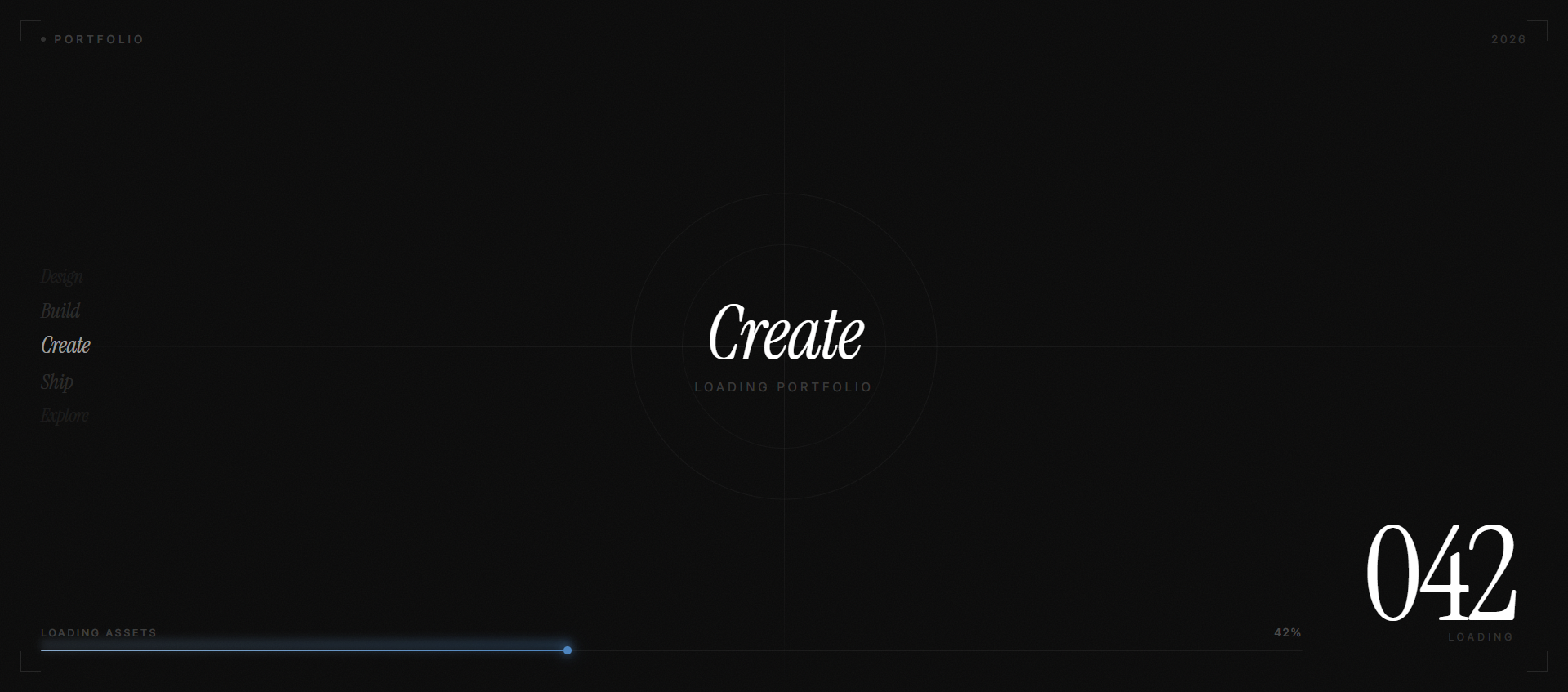
Fullscreen animated loading screen with cycling word animation, zero-padded 3-digit counter, gradient progress bar, and smooth page reveal. Built with Framer Motion.
animationloaderclaudecursorreactframer-motionportfolionextjstypescript
When to use
Use on any portfolio or creative website as the initial page load experience. Runs once, then fades out to reveal the main content.
Recommended LLMs
Claude SonnetGPT-4o
Plugins / Skills
Artifacts (Claude)
When to use
This loading screen is a statement — it tells visitors "this site was built with intention." The three rotating words ("Design → Create → Inspire") and the large counter are the hero elements. The entire thing is self-contained and self-destructing — it fires once, calls onComplete, and the parent handles showing the page.
What you'll need to customise
- Words array —
["Design", "Create", "Inspire"]— swap with words relevant to your work or brand - "Portfolio" label — top-left corner text — swap with your name or site section
- Duration — currently 2.7s counter. Adjust
2700inrequestAnimationFrameto speed up or slow down - Progress bar gradient —
#89AACC → #4E85BF— swap to your brand colors - Font — "Instrument Serif" italic (
font-display) — swap to your heading font
Tips for best results
- The counter uses
requestAnimationFrame, NOTsetInterval— this makes it perfectly smooth at any FPS - Use a
refforonCompleteto avoid stale closure issues in theuseEffect - The parent
AppWrappermust use<AnimatePresence mode="wait">to enable the exit animation padStart(3, '0')formats7as007— don't change this formatting- The exit animation (
opacity: 0, duration: 0.6s) on the loader overlaps with the page fade-in (opacity: 0→1, 0.5s transition) — this overlap is intentional
Expected output
Two components:
LoadingScreen— the loading UI, receivesonComplete: () => voidAppWrapper— wraps your app, controls visibility with<AnimatePresence>
Timing:
0.0s— Counter starts at000, "Design" appears0.9s— "Create" replaces "Design"1.8s— "Inspire" replaces "Create"2.7s— Counter hits100, progress bar full3.1s—onCompletefires (400ms delay)3.7s— Page content fully visible
The Prompt
Copy it, paste it, use it.
Build a fullscreen loading screen component in React (Next.js 14 / Vite, TypeScript). Uses Framer Motion for animations.

### Tech Stack
- React + TypeScript (Next.js 14 or Vite)
- Framer Motion (`framer-motion`)

### Theme Variables (add to global CSS)
```css
--bg: #0a0a0a;
--text: #f5f5f5;
--muted: #888888;
--stroke: #1f1f1f;
```

Font: `font-display` → "Instrument Serif" (Google Fonts, italic, weight 400)

### Component: `LoadingScreen`

**Props:** `onComplete: () => void`

**Container:**
- `motion.div` — `fixed inset-0 z-[9999]` — `bg-[#0a0a0a]`
- Exit animation: `exit={{ opacity: 0 }}`, `transition={{ duration: 0.6, ease: [0.4, 0, 0.2, 1] }}`
- Wrap in `<AnimatePresence mode="wait">` from parent

**Element 1 — "Portfolio" Label (top-left):**
- `motion.div absolute top-8 left-8 md:top-12 md:left-12`
- Text: "Portfolio" — `text-xs md:text-sm text-[#888888] uppercase tracking-[0.3em]`
- `initial={{ opacity: 0, y: -20 }} animate={{ opacity: 1, y: 0 }} transition={{ duration: 0.6, delay: 0.1 }}`

**Element 2 — Rotating Words (center):**
- `absolute inset-0 flex items-center justify-center`
- Words: `["Design", "Create", "Inspire"]` — cycle via `setInterval` every 900ms
- Increment index but stop at last word (no loop)
- `<AnimatePresence mode="wait">` wrapping a `motion.span` keyed by `wordIndex`:
  - `text-4xl md:text-6xl lg:text-7xl font-display italic text-[#f5f5f5]/80`
  - `initial={{ opacity: 0, y: 20 }}`
  - `animate={{ opacity: 1, y: 0 }}`
  - `exit={{ opacity: 0, y: -20 }}`
  - `transition={{ duration: 0.4, ease: [0.4, 0, 0.2, 1] }}`

**Element 3 — Counter (bottom-right):**
- `motion.div absolute bottom-8 right-8 md:bottom-12 md:right-12`
- Count from `0` to `100` over exactly `2700ms` using `requestAnimationFrame`:
  ```ts
  const start = performance.now()
  const animate = (now: number) => {
    const elapsed = now - start
    const progress = Math.min(elapsed / 2700 * 100, 100)
    setProgress(progress)
    if (progress < 100) requestAnimationFrame(animate)
    else setTimeout(() => onCompleteRef.current(), 400)
  }
  requestAnimationFrame(animate)
  ```
- Display: `{Math.round(progress).toString().padStart(3, '0')}` — always 3 digits (007, 042, 100)
- `text-6xl md:text-8xl lg:text-9xl font-display text-[#f5f5f5] tabular-nums`
- Entrance: `initial={{ opacity: 0, y: 20 }} animate={{ opacity: 1, y: 0 }} transition={{ duration: 0.6, delay: 0.1 }}`

**Element 4 — Progress Bar (bottom edge):**
- `absolute bottom-0 left-0 right-0`
- Track: `h-[3px] bg-[#1f1f1f]/50 w-full`
- Fill: `motion.div` inside track:
  - `h-full origin-left`
  - `background: linear-gradient(90deg, #89AACC 0%, #4E85BF 100%)`
  - `boxShadow: "0 0 8px rgba(137, 170, 204, 0.35)"`
  - `initial={{ scaleX: 0 }} animate={{ scaleX: progress / 100 }} transition={{ duration: 0.1, ease: "linear" }}`

### Parent: `AppWrapper`

```tsx
const [isLoading, setIsLoading] = useState(true)

return (
  <>
    <AnimatePresence mode="wait">
      {isLoading && <LoadingScreen onComplete={() => setIsLoading(false)} />}
    </AnimatePresence>
    <main style={{ opacity: isLoading ? 0 : 1, transition: 'opacity 0.5s ease-out' }}>
      {/* your page content */}
    </main>
  </>
)
```

Use a `ref` for `onComplete` inside the loader:
```ts
const onCompleteRef = useRef(onComplete)
useEffect(() => { onCompleteRef.current = onComplete }, [onComplete])
```